

Changing the theme in FL Studio is pretty straightforward.
To change the theme, click the “Options” menu, then choose “Theme settings.” Now from the newly opened theme tab, choose your preferred theme.
For a better clarity, let’s look at the steps visually and with more details.
Once you open FL Studio, go to the menu bar and click on the Options menu.

Once you click, it’ll show you many options.
Now, select the Theme settings option shown under the system options.

Once you click the Themes settings, a new tab will open up showing all the themes on your computer.

Subscribe
Enter your email below to receive updates.
From there, you can choose any theme you like.
For example, I chose the Veela theme, and the entire look of the FL Studio changed (see the image below).
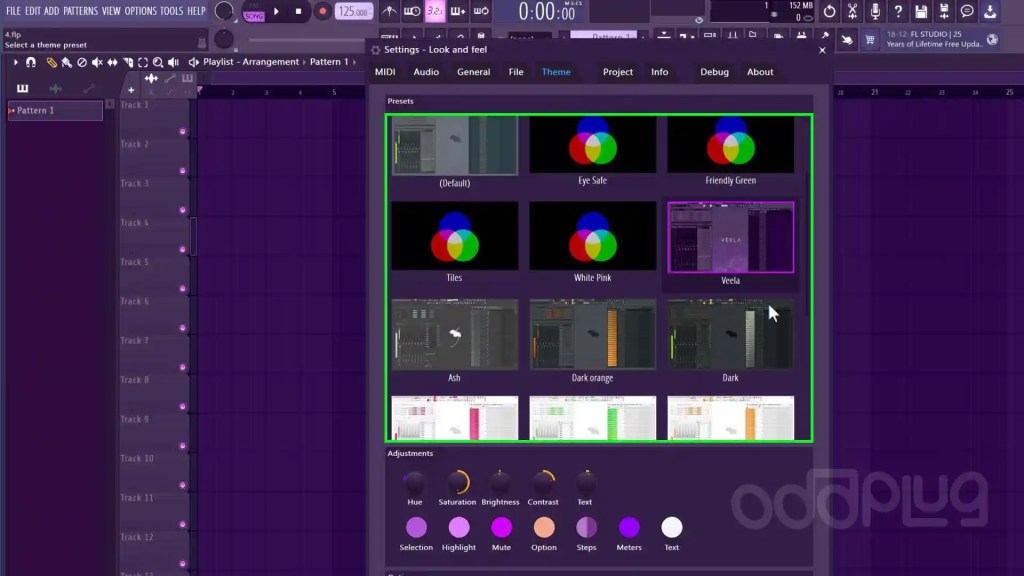
That’s how it’s done.
If you are interested in finding some great-looking FL Studio themes, I’ve crafted a post just for it 👉 Best FL Studio themes.
Once you download these themes, you can add them to FL Studio by following the steps in this post 👉 Adding new themes to FL Studio.
Subscribe
Enter your email below to receive updates.



Leave a Reply